
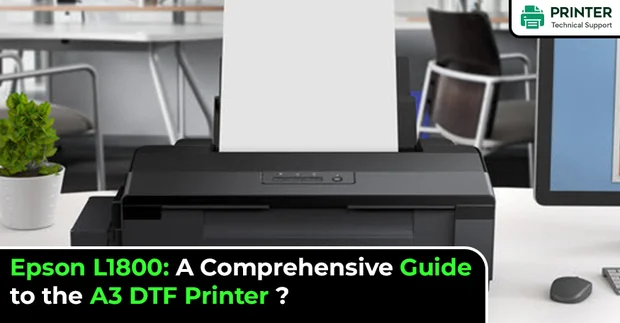
Epson L1800: A Comprehensive Guide to the A3 DTF Printer
Epson L1800: A Comprehensive Guide to the A3 DTF Printer
In the printing community, the Epson L1800 is a well-liked Direct Film (DTF) printer that has drawn much attention. This A3 printer is a well-liked option for photographers and painters due to its exceptional print quality and dependability.
We will go over all the important details of the Epson L1800: A Comprehensive Guide to the A3 DTF Printer in this post, such as its features, how to tell the difference between real and fake printheads, and where to get the best parts for your printer.

New vs. Used L1800 Printhead
The distinction between a new and used printhead is important to know when it comes to replacing the printhead on your L1800. Prints made with a new L1800 printhead will have crisp details and correct colours.
However, a false or old printhead could be the source of your printer's problems, like clogged nozzles or poor print quality. Investing in a genuine new L1800 printhead is imperative to ensure the best possible print quality.
Where to Purchase an Authentic New L1800 Printhead
Purchasing a genuine new L1800 printhead from an authorised Epson dealer or merchant is the best option. Epson provides a large selection of printheads, including the L1800, for their printers. You can ensure you're obtaining a genuine product covered by Epson's ensure by buying from an authorised dealer. Disposable L1800 Printhead It's critical to be mindful of counterfeit L1800 print heads being sold on websites like eBay, Amazon, and AliExpress.
These counterfeit goods can interfere with your printer since they are frequently constructed of subpar materials. If you use them, they can also make your warranty worthless. Always purchase from an authorised Epson dealer or merchant to prevent getting a fake printhead. Additionally, as they are compatible, you may inquire about the dealer for an "Artisan 1430 printhead" for the North American market.
L1800 Printhead Repair
Sometimes, you may need to repair the printhead on your L1800. This may occur if the printhead sustains damage or the nozzles clog. If you need to fix your printhead, contacting an authorised Epson dealer or repair service is preferable. They are qualified to identify the issue and offer the most effective fix for your printer.
The Epson L1800 is a dependable, superior Direct-to-film printer with outstanding output. If you want to replace the printhead on your L1800, obtain a genuine new printhead from an authorised vendor. By doing this, you can ensure that your printer keeps working properly and that your prints are of the highest quality.
- SAM
 Brand: Epson Printer
- Last Update: 1 hour ago
 Related Articles
Top Searches in Epson Printer
Featured Articles
How to Get Canon Printer Online on MAC?
Aug 14, 2026
How to Fix Printer Printing Horizontal Black Lines?
Aug 14, 2026
How to Scan from HP Printer to Computer Windows 10?
Aug 14, 2026
Ricoh Printer Stuck on Processing
Aug 14, 2026
Brother Printer Only Printing in Black and White
Aug 14, 2026
How to Clean Kodak Printhead?
Aug 14, 2026
How to Install Lexmark Printer to Computer Without CD?
Aug 14, 2026
Why My Samsung Printer is Not Printing Clearly?
Aug 14, 2026
Top Questions
Why Won't My Canon Printer Print after Changing an Ink Cartridge?
Aug 14, 2026
How do I Fix a Canon Printer 1403 Error?
Aug 14, 2026
How do I Connect My Canon MG3050 Printer to WiFi?
Aug 14, 2026
How to Change Printer from Offline to Online Canon?
Aug 14, 2026
How to Turn My Ricoh Printer Online from Offline?
Aug 14, 2026
Brother MFC Printer Won't Print Black Despite Full Ink Cartridges
Aug 14, 2026
How to Fix Epson Printer Filter Failed or Stopped on Mac Error?
Aug 14, 2026
How do You Get a Lexmark Printer Back Online?
Aug 14, 2026
Categories
Article Article Article Article Article Article Article Article Article Article