
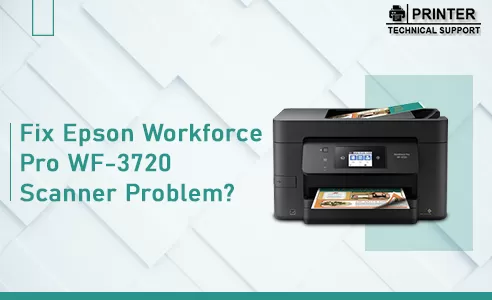
Fix Epson Workforce Pro WF-3720 Scanner Problem - Thin Vertical Stripes on Complete Scan
Hello all I've just tried to use the scanner on my Epson Workforce Pro WF-3720 for the first time not just to make a copy of a textdocument but to scan a foto from the glass. Weirdly I get thin vertical stripes over the whole scan. Even more weirdly these stripes do not appear when scanning via the touchpad of the Printer itself using the standard setup for JPEG-scan 75 Quality 300 DPI. It only appears when I change the settings of the JPEG-scan to a higher quality 100 Quality DPI doesn't matter. The same happens generally when I scan via Epson Scan from my computer no matter if I choose Bitmap JPEG or whatever 300 or 600 DPI vertical stripes always. The glass is 100 clean. I am NOT talking about an ADF scan. Scanning over the main glass panel. Thanks for any advice Cheers Jacob
 1 Ans
1 Ans- 5 years ago
Epson Workforce Pro wf-3720 Scanner Error:
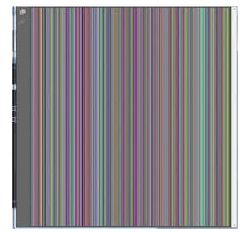
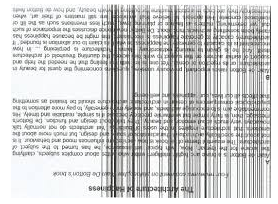
Vertical lines on complete scan on the images you scan into the computer and copies you make are typically caused by dirt or correction fluid on ADF(Automatic Document Feeder) or scanner unit.
The Scanner unit is the mechanism that reads in the documents that are being copied or scanned.
Vertical Lines Colored and Black are Shown in Below Images:
There are Some Troubleshooting Steps to Fix Epson Workforce Pro WF-3720 Scanner Issue are Given Below:
Step 1: This problem is usually resolved by cleaning the ADF glass and the ADF pressure bar located on the underside of the document cover.
Step 2: You need to lift the document cover to clean.
Step 3: Then you need to clean the following areas on the flatbed with a lint-free cloth with isopropyl alcohol as shown in the figure below

Step 4: Then you need to unfold the ADF documents support and then open the ADF cover.
Step 5: Then Clean the following two areas on the ADF with a lint-free cloth moistened with isopropyl alcohol as shown in below figure.
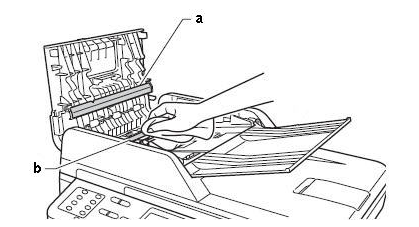
Step 6: Then you need to clean the white pressure bar located on the ADF cover and the thin glass strip located under the white pressure bar.
Step 7: Then after the cleaning you need to Test the printer by making a copy to make a copy you need to place the documents face up in the ADF and adjust the paper guides(1) to the width of the paper as shown in the figure below.
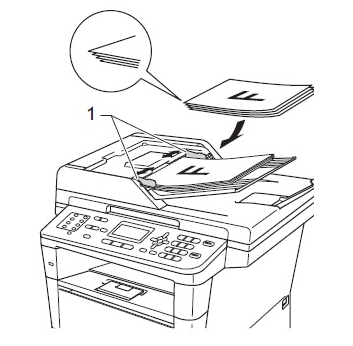
Step 8: Then you need to press START.
Note:
If the lines still appear, you need to repeat the cleaning by following step 3 and step 5 or in addition you need to clean the small glass strip or you can also check by running your fingertip over the glass to see if you feel anything on it.
You may need to repeat the cleaning process 3 or 4 times to eliminate all dirt or debris on the glass.
After each cleaning make a copy to test. If the lines are gone discontinue troubleshooting.
- 2 years ago
 Related Articles


Top Searches in Epson Printer
Featured Articles
How to Get Canon Printer Online on MAC?
Sep 19, 2026
How to Fix Printer Printing Horizontal Black Lines?
Sep 19, 2026
How to Scan from HP Printer to Computer Windows 10?
Sep 19, 2026
Ricoh Printer Stuck on Processing
Sep 19, 2026
Brother Printer Only Printing in Black and White
Sep 19, 2026
How to Clean Kodak Printhead?
Sep 19, 2026
How to Install Lexmark Printer to Computer Without CD?
Sep 19, 2026
Why My Samsung Printer is Not Printing Clearly?
Sep 19, 2026
Top Questions
Why Won't My Canon Printer Print after Changing an Ink Cartridge?
Oct 7, 2020
How do I Fix a Canon Printer 1403 Error?
Dec 30, 2020
How do I Connect My Canon MG3050 Printer to WiFi?
Mar 30, 2021
How to Change Printer from Offline to Online Canon?
Nov 27, 2020
How to Turn My Ricoh Printer Online from Offline?
Feb 20, 2021
Brother MFC Printer Won't Print Black Despite Full Ink Cartridges
Nov 7, 2020
How to Fix Epson Printer Filter Failed or Stopped on Mac Error?
Dec 7, 2021
How do You Get a Lexmark Printer Back Online?
Sep 29, 2020