
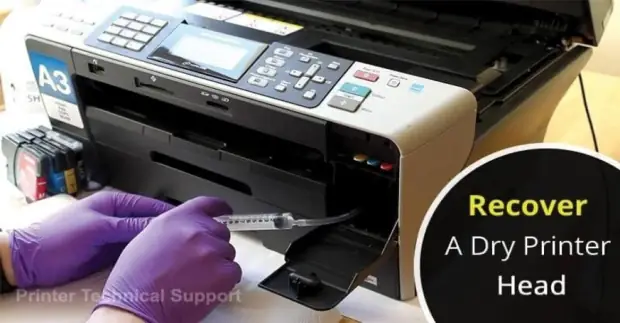
How to Recover a Dry Printer Head?
Recover a Dry Printer Head:
Print heads are one of the major components of printers that smear the ink onto the paper in a specific pattern. This is the reason for any failure in the printheads, cartridges can affect the printing. Although drying out of printer head/ink cartridges is a common problem but we can’t ignore it.
Dried printer heads cause the ink to clot inside the cartridges and prevent it from ejecting via the nozzles. Although there are various reasons why ink cartridges tend to get dried up and cause interference with normal printing. If you don’t use your printer frequently, then it can result in the cartridges to become dried up fast. One of the easiest fix to resolve this problem is to print something once in a week and perform some nozzle cleans.
To recover a dry printer head, you should run print head cleaning function on your printer. If you are unsure how to do this, then read the user manual that came with your printer.
Follow These Steps to Recover a Dry Printhead -
Step 1 – Remove the Cartridges
In some printers, the head is attached to ink cartridges but such cartridges are expensive as well as worse in quality.
Step 2 – Remove the Printhead
For removing the printhead, you need to pull up the grey lever. Although the head will come out without any resistance. While removing printer head, please don’t touch the rear contacts and the bottom side where you have to find the ink nozzles.
Step 3 – Find the Proper Suction Tube
At this moment, you have to find out a rubber tube of that has the right diameter for the cartridge joints on the printer head.
Step 4 – Dip into Water
Now, you have to set up a plastic flat cover with some millimeters of waters. Please don’t use the ceramic plate or anything else that is made up of hard material. The reason behind this is that nozzles borders are ceramic and they can break very easily.
Now, put the stuff to soak for some time. Now dry ink will dissolve in the water. Now, try to function some water from the plate into the nozzles. For this, there is no need to suck the tape, just keep it in place, push the sides, close the open ends and let it sucks for you resuming the original shape. Then wait for some time.
Step 5 – Dry the Head
At the time of reinstalling head on the printer, dry it and then gently push it on a paper napkin. Now, let the water coming out for a few moments. Now the print head is almost clean. Don’t worry if still water is present inside.
Now install head back into the place. After this, close the lever, place all cartridges, close the printer and turn it off. After some time, turn on your printer. Now, you can perform nozzle cleaning but it is totally up to you. After cleaning, print a check sheet to confirm if all nozzles are clean and working properly.
If still, you are not satisfied with your printer’s performance then don’t worry at all, just get in touch with experts at Printer Technical Support Number and get an immediate fix. So, get in touch with our experts at any time and get over all printing nuisances.
Also Read:
- How to Fix Dell Support Assist Not Working or Reponding?
- Where is the WPS Pin on My Dell Printer?
- My Dell Printer is Not Printing
- Mick
 Brand: Dell Printer
- Last Update: 2 hours ago
 Related Articles
Top Searches in Dell Printer
Featured Articles
How to Get Canon Printer Online on MAC?
Sep 15, 2026
How to Fix Printer Printing Horizontal Black Lines?
Sep 15, 2026
How to Scan from HP Printer to Computer Windows 10?
Sep 15, 2026
Ricoh Printer Stuck on Processing
Sep 15, 2026
Brother Printer Only Printing in Black and White
Sep 15, 2026
How to Clean Kodak Printhead?
Sep 15, 2026
How to Install Lexmark Printer to Computer Without CD?
Sep 15, 2026
Why My Samsung Printer is Not Printing Clearly?
Sep 15, 2026
Top Questions
Why Won't My Canon Printer Print after Changing an Ink Cartridge?
Sep 15, 2026
How do I Fix a Canon Printer 1403 Error?
Sep 15, 2026
How do I Connect My Canon MG3050 Printer to WiFi?
Sep 15, 2026
How to Change Printer from Offline to Online Canon?
Sep 15, 2026
How to Turn My Ricoh Printer Online from Offline?
Sep 15, 2026
Brother MFC Printer Won't Print Black Despite Full Ink Cartridges
Sep 15, 2026
How to Fix Epson Printer Filter Failed or Stopped on Mac Error?
Sep 15, 2026
How do You Get a Lexmark Printer Back Online?
Sep 15, 2026
Categories
Article Article Article Article Article Article Article Article Article Article